

Overview
See the path a call takes through your phone system, on one screen.
Overview is a map of what happens when someone calls. Use it to check your setup after a change, or to explain it to a new manager.
Sidebar → Phone system setup → Overview
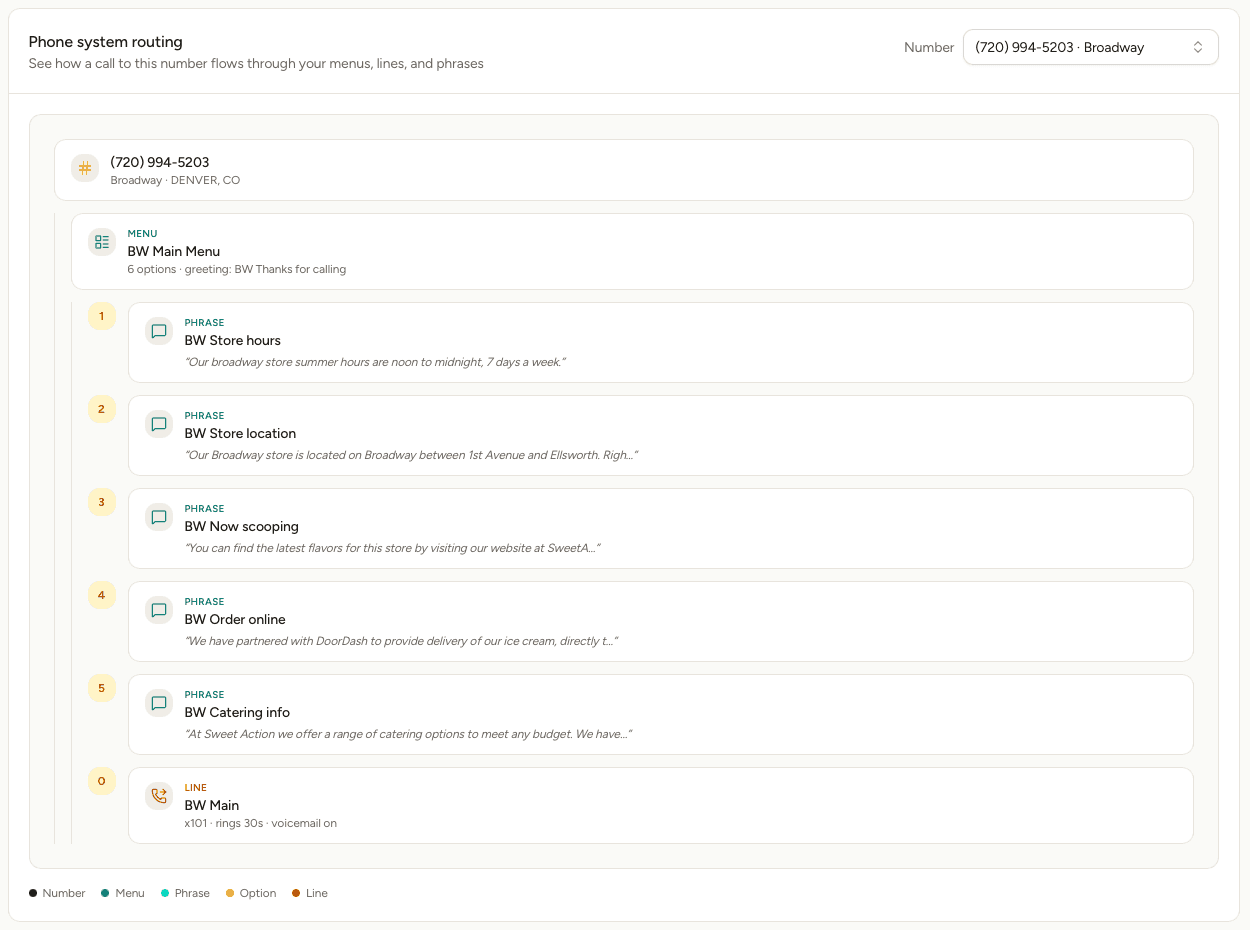
Read the map
Read from top to bottom:
- The number the customer dials.
- The menu that answers, with its greeting and how many options it has.
- Each option, shown by its key, and where it leads: a phrase that plays, with the start of its script, or a line that rings, with its extension, ring time and whether voicemail is on.
The colour key under the map shows which is which. Select any box to open that piece for editing.
Look at a different number
If this location has more than one number, choose it from the list at the top right.
When something isn't connected
If a number has nowhere to send its calls, Overview says so rather than drawing an empty map. The same is true of a menu key that was set up but never pointed at anything. Both are worth fixing: a caller who reaches one hears nothing useful.
If this location has no numbers yet, Overview offers you a starting point instead of a map.