

Menus
Build the "press 1 for hours" choices your callers hear.
A menu greets the caller and offers choices. Each choice is a key on the phone. A good menu answers the common questions — hours, address, ordering — so your staff only pick up for callers who need a person.
Sidebar → Phone system setup → Menus
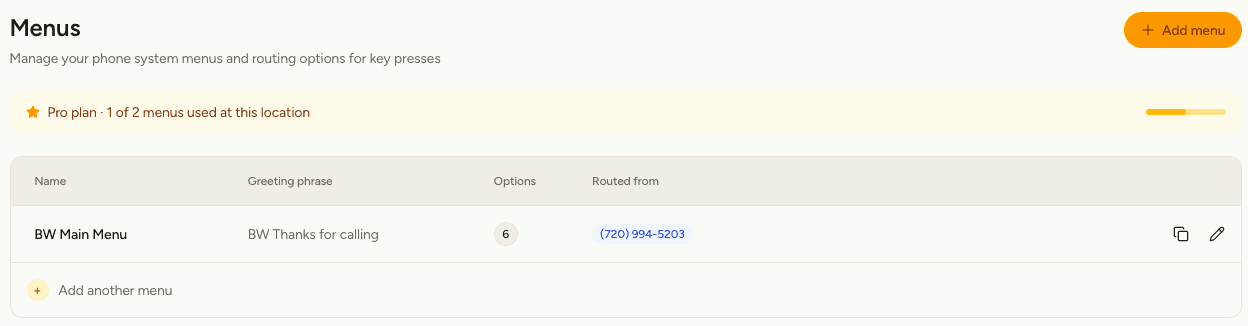
What you'll see
| Column | Meaning |
|---|---|
| Name | What you call this menu. Callers never hear it. |
| Greeting phrase | What callers hear when they reach it. |
| Options | How many keys do something. |
| Routed from | The numbers and menus that send callers here. |
Create a menu
Write the greeting first, under Phrases. It needs to say out loud what each key does: "For store hours, press 1. For our address, press 2. To speak to someone, press 0."
Set what each key does
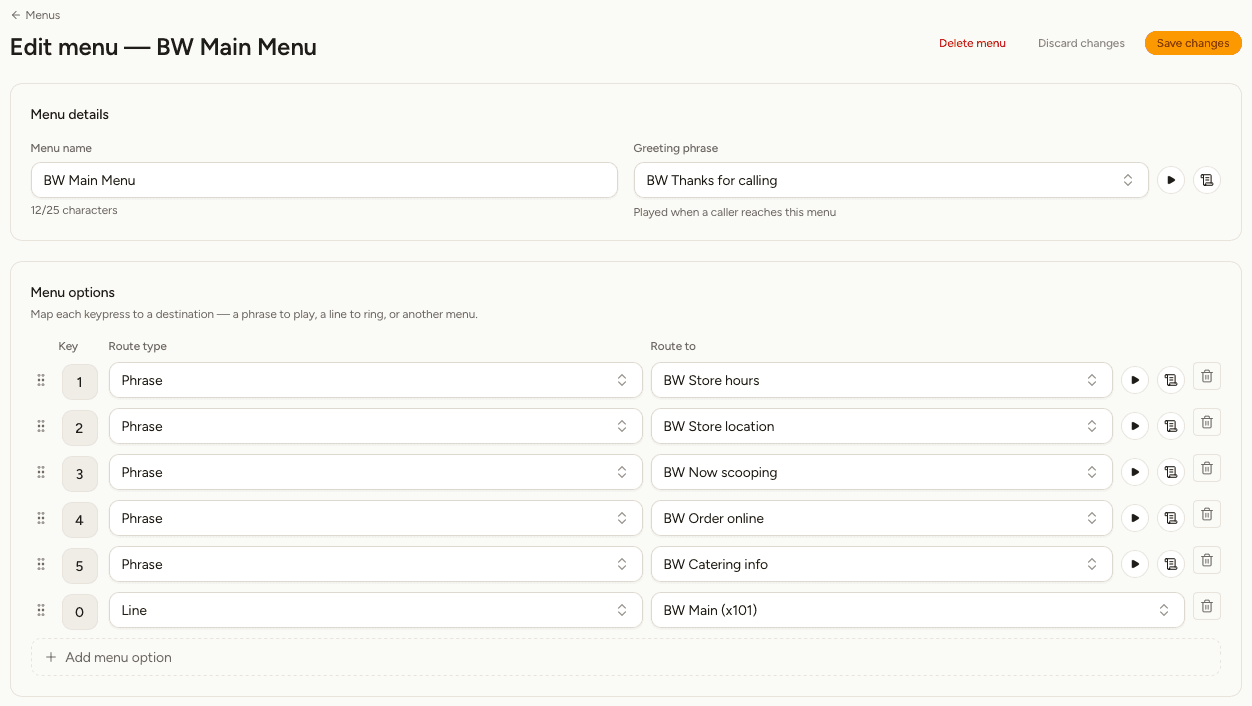
For each option, choose:
- The Key the caller presses — 0 to 9, * or #.
- The Route type: a Phrase to play, a Line to ring, or another Menu to open.
- Route to: which phrase, line or menu.
Select Add menu option to add another key. Drag the handle at the left of a row to reorder, and select the bin to remove an option.
After a phrase plays, the caller comes back to the menu and can choose again — so "press 1 for hours" doesn't end the call, and a caller who wants your address next can press 2.
Keep the greeting and the keys in step. If you change what key 3 does, update the greeting's script so it still describes key 3 correctly. Nothing checks this for you, and the caller only has what they hear.
Tips for a menu callers like
- Put the most common request first.
- Offer four or five choices at most. Callers stop listening after that.
- Always give a way to reach a person. Key 0 is what people expect.
- Say the reason before the key: "For store hours, press 1", not "Press 1 for store hours".
Menus inside menus
On Pro and Scale, an option can lead to another menu — "For catering, press 5" opening a catering menu. Create the second menu first, then choose it as the route.
Keep it to one extra level. A caller three menus deep has usually hung up.
Copy or delete a menu
Select the copy icon on a row to duplicate a menu into the same location, with its options intact. Useful as a starting point for a second menu.
To delete a menu, open it and select Delete menu. Any number pointing at it is set back to Not routed, so no caller is left reaching a menu that no longer exists.
Put a menu to work
A menu does nothing until a number routes to it. Open Numbers and set Routes to.