

Billing and plans
See what you're paying, change your plan, and add locations or extras.
Everything about what you pay is on one tab, and nothing changes until you select Save.
Sidebar → Settings → Organization → Billing
What you're paying
The card at the top shows your monthly total, your plan, how many locations you pay for, any extras, and whether you're billed monthly or yearly.
Compare plans
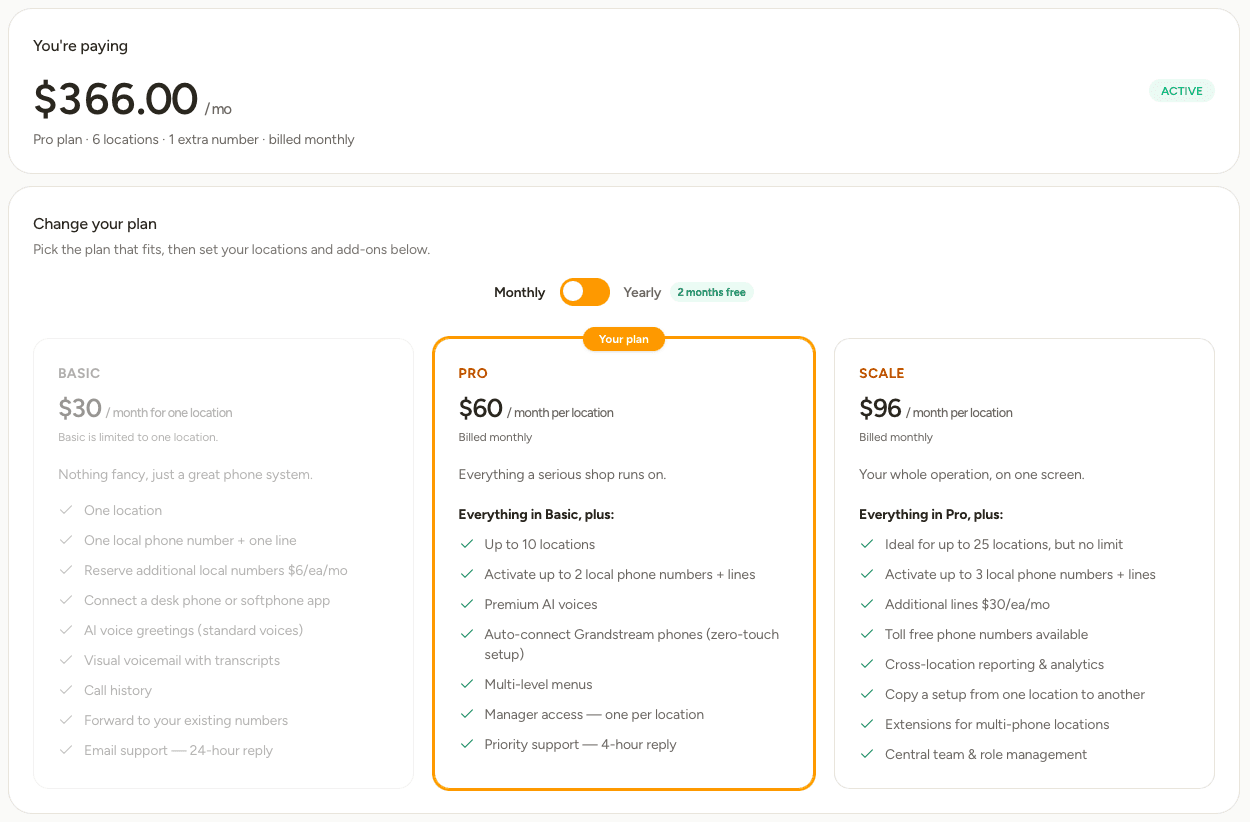
| Basic | Pro | Scale | |
|---|---|---|---|
| Price | $30 a month | $60 a month per location | $96 a month per location |
| Yearly | $300 a year | $600 a year | $960 a year |
| Locations | 1 | Up to 10 | No limit |
| Numbers included, per location | 1 | 2 | 3 |
| Lines included, per location | 1 | 2 | 3 |
| Menus included, per location | 1 | 2 | 5 |
| Phrases included, per location | 5 | 15 | 30 |
| Voices | Standard — 20 voices | Premium — full catalogue | Premium — full catalogue |
| Automatic Grandstream phone setup | – | Yes | Yes |
| Menus inside menus | – | Yes | Yes |
| Support reply time | 24 hours | 4 hours | 4 hours |
Every plan starts with a 7-day free trial. Choose Yearly to pay for ten months instead of twelve.
Change your plan
Moving up takes effect at once. Moving down takes effect too, so make sure you're within the smaller plan's allowances first — remove the extra lines, menus or phrases, and disconnect any phones under Devices if you're moving to Basic.
Add locations or extras
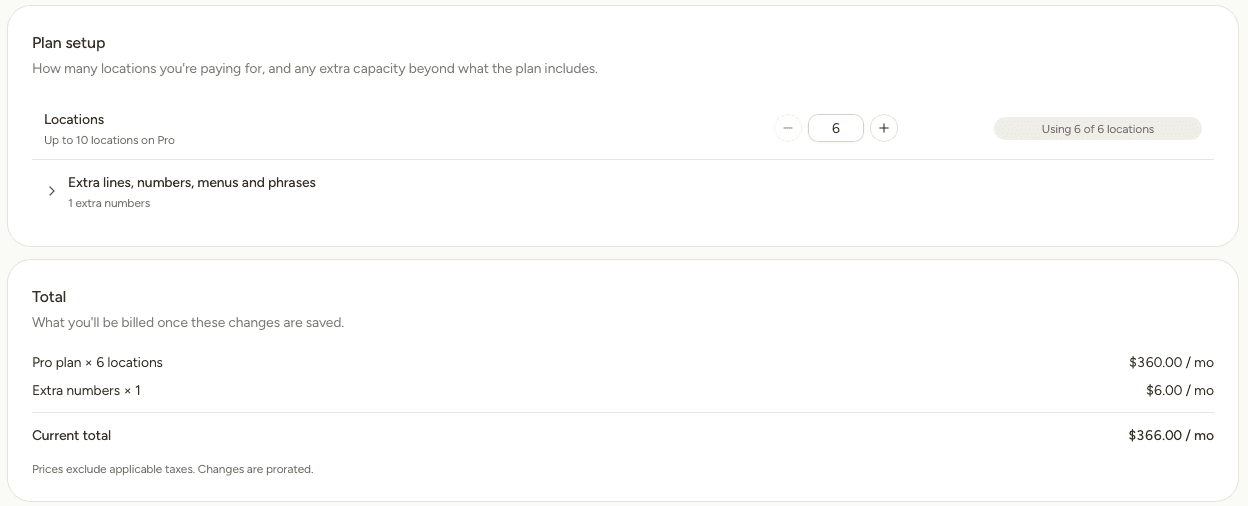
- Locations: use + and – to set how many shops you pay for. The bar beside it shows how many you're using.
- Extras: open this row to add capacity beyond what your plan includes.
What you can add depends on your plan:
| Extra | Basic | Pro | Scale |
|---|---|---|---|
| Phone numbers | $6 each a month | $6 each a month | $6 each a month |
| Lines | Move up a plan | Move up a plan | $30 each a month |
| Menus | Move up a plan | Move up a plan | $6 each a month |
| Phrases, in packs of 5 | Move up a plan | Move up a plan | $6 a pack a month |
Total lists each charge and what you'll be billed once you save. Prices exclude tax. Changes part-way through a billing period are prorated, so you only pay for the time you use.
The usage banner
Numbers, Lines, Menus and Phrases each show a banner with how much of your plan you've used at that location.

When it's full, either remove something you no longer need or come back here to add more. Numbers still being moved across from another phone company count towards the total while they're on their way.
Invoices and payment method
Your card details and past invoices are held by our payment provider. Open the billing portal from the Billing tab to update your card, download an invoice or change your billing address.
Need something bigger than Scale, or a setup that doesn't fit these plans? Get in touch.