

Team members
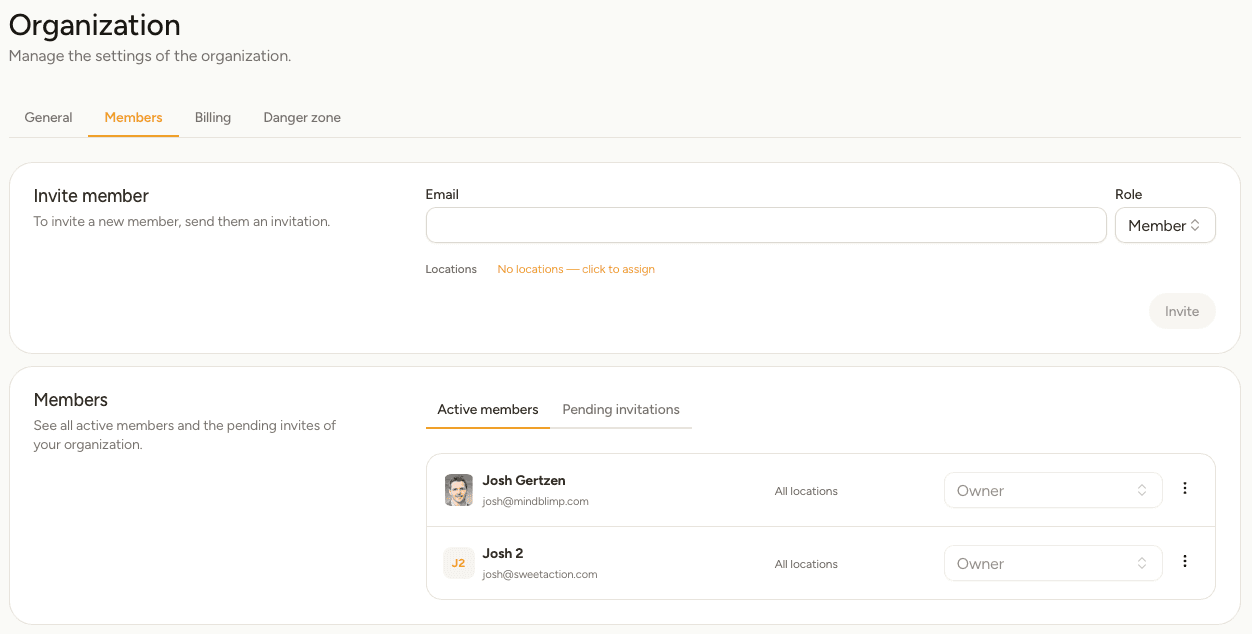
Invite managers and staff, and choose which shops each person can see.
Give each person their own sign-in instead of sharing yours. You decide which locations they can work on.
Sidebar → Settings → Organization → Members
Roles
| Role | Can do |
|---|---|
| Owner | Everything, including billing and deleting the organization. The person who created it. |
| Admin | Everything except owner-only actions — set up the phone system, invite people, manage members. |
| Member | Work in the locations they've been given: take calls, check voicemail, read call history, change the phone setup there. |
Whatever the role, a person only sees the locations you give them.
Invite someone
Until they accept, the invitation sits under Pending invitations, where you can cancel or resend it.
Change or remove someone
Under Active members, use the role list on a person's row to change their role, or the menu at the end of the row to remove them.
Removing someone takes away their access immediately. It also takes them off any voicemail notification lists they were on, so check Voicemail settings afterwards if they were the only person being notified.
A manager who runs one shop should only have that location. They won't see the others in the location switcher, and their Summary, Call history and Voicemail cover only their own shop.